Showing posts with label AP Planning and Research. Show all posts
Showing posts with label AP Planning and Research. Show all posts
Thursday, 27 January 2011
Focus Group - Music Video
For my focus group I am going to get people of my age and also my form tutor to get involved as they are my bracket for my target audience, my form group is actually very small so the number of students in there is a reasonable number for a focus group. My focus group will be shown in my form group on Monday 31st January in the morning. From my focus group I am aiming to find out what people actually think of my music video project. And I am hoping that everyone who is involved will be honest and willing to tell the truth about what they think. This will make my questions I ask more reliable and more useful to me. In my focus group I am going to film my responses of what people think. This is a easier way to receive the information people give me, and I will not miss anything that someone says especially if I was to miss something that was very important to me, which could help me out in researching what people thought. After filming my Focus Group I am going to place a link on to blogger so it is easy to find.

Focus Group - Music Video Questions
As a group we have decided that we are going to organise a focus group which we film to show what people think of our music video. We have decided to use a focus group as I believe it is much more effective than a questionnaire as it is more useful as we are more likely to receive more sensible answers than a normal online questionnaire. It will also be easier than waiting for answers from out online questionnaires from SurveyMonkey which is linked to my Facebook and twitter account.
1. What was your first impressions of the project?
2. Do you feel that you understood the narrative (story)?
3. Did you enjoy watching this video, did it hold your attention?
4 What did you like about this music video?
5. Is there anything that you think would make the music video better?
6. After watching this music video, would you be interested to look at the website, or the single cover for the song, why?
7. What was your favourite part of the Music Video?
1. What was your first impressions of the project?
2. Do you feel that you understood the narrative (story)?
3. Did you enjoy watching this video, did it hold your attention?
4 What did you like about this music video?
5. Is there anything that you think would make the music video better?
6. After watching this music video, would you be interested to look at the website, or the single cover for the song, why?
7. What was your favourite part of the Music Video?
Monday, 24 January 2011
Questionnaires - Audience feedback
Webpage Questionnaire
Click here to take survey
DigiPak Questionnaire
Click here to take survey
Click here to take survey
DigiPak Questionnaire
Click here to take survey
Thursday, 20 January 2011
Changes on my webpage 19-Jan-2011
Today I changed my idea of my banner on my webpage as I believed that my first banner was not very well edited so I decided to change the banner to the single cover. Which shows that my banner will change a lot depending on when new singles or albums are coming out. It almost gives the audience a sneak peak into the music video. Also instead of having 'Fan Uploads' I decided to change it to "Behind the scenes' as I believe the audience to my webpage will be more intrigued in seeing images from behind the scenes of the new music video. Also I decided to move the social group logos from the top of the page to the bottom as the target group being more around my age of 18, I would click straight on to the Facebook logo and this would turn me away from the webpage. This would lose the audience from my webpage. I also updated the webpage by changing the album which was on there to my own DigiPak which is my single.
This is a image of how my webpage looked before I made changes to it.

Here is the new webpage with the changes. Their is also one more change that I have to change and that is just to upload my final video. A video is on the page this is where my music video project is going to be placed.

This is a image of how my webpage looked before I made changes to it.

Here is the new webpage with the changes. Their is also one more change that I have to change and that is just to upload my final video. A video is on the page this is where my music video project is going to be placed.

Wednesday, 5 January 2011
Blog Update 5th January 2011 and class feedback
Today we carried on editing our music video and the only problem that we had was the rendering of the video. This made the video hard to edit as it was taking to long to load. This also made the video hard to watch, which made it difficult to find mistakes. We began to use different effects on the Mac which we used colouring, such as black and white.
Group feedback;
In our class today we went round to everyones video project and suggested what could be changed and what we liked on their video. The feedback for my groups video was as followed;
- The black and white is a good effect, it makes the detail stand out more and has greater impact.
This is good feedback for my group as this is what we were aiming for we wanted our video to be different. The black and white effect does not last long because as soon as our tramp puts the headphones on the colour goes back to bright.
- It goes from having no children in the shot, to loads (like they just appear out of nowhere).
This I found interesting because as a group we did not even notice this mistake as we knew why there was more children around. But to a different audience they did not. We have decided to put in a black out after the shot of the teacher at the window as this makes it look like time has passed.
-Someone is filming in the left hand corner
Something that my group did not spot. We are going to fix this as it is a good shot to keep. To fix this we are going to trim the frame of the clip to cut me who is filming out.
Group feedback;
In our class today we went round to everyones video project and suggested what could be changed and what we liked on their video. The feedback for my groups video was as followed;
- The black and white is a good effect, it makes the detail stand out more and has greater impact.
This is good feedback for my group as this is what we were aiming for we wanted our video to be different. The black and white effect does not last long because as soon as our tramp puts the headphones on the colour goes back to bright.
- It goes from having no children in the shot, to loads (like they just appear out of nowhere).
This I found interesting because as a group we did not even notice this mistake as we knew why there was more children around. But to a different audience they did not. We have decided to put in a black out after the shot of the teacher at the window as this makes it look like time has passed.
-Someone is filming in the left hand corner
Something that my group did not spot. We are going to fix this as it is a good shot to keep. To fix this we are going to trim the frame of the clip to cut me who is filming out.
Monday, 13 December 2010
Banner for my webpage.
Here is my Banner of the band that I have made which was made on a programme called GIMP.


Webpage - Ancillary Text 1
Here is my design for my webpage. It has been created on a programme called iWeb. One more change has to be made to it which is the change of the youtube link to my Music Video.


DigiPak design
Here is my paper design of my digipak with a rough idea of how I would like mine to look.
Front and back

This is the middle of my digipak.

Front and back

This is the middle of my digipak.

Wednesday, 8 December 2010
Editing Music Video
Today I began to Edit our media project of our music video. This faced some problems as the Mac kept freezing and made it very hard to edit and place the song in time with the shots. The Mac was freezing and made it hard to watch the video.
This took up most of the time of the two hours lesson that we had.
This took up most of the time of the two hours lesson that we had.
Monday, 6 December 2010
CD/ Digipak analysis 3

The CD cover for the razorlight album is very dull I think because the colour black is the main colour that is on the album and is very dull. The colour red I believe is used effectively because it stands out and is easy to read. The images of the band is very effective because every member of the band is being seen and has their own individual image. These images are not bright but still are dull with the fading black and the blue background which fades in. The images are big so they are easy to see and the the fan base will recognise the band easy. The font is bold and easy to read as it is all in bold font.
CD/Digipak analysis 2
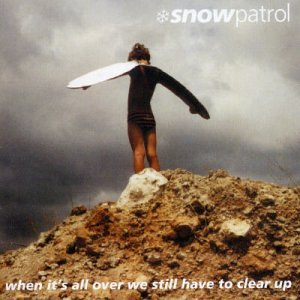
This album cover from the band Snow Patrol is very different to the album cover above. The genre of the band is Indie and the target audience I believe is for 18-60 years old. They have a wide selection of fans and have a lot of albums that they have released as they are a world wide band. I think that this CD cover is very boring and very plain as the colours are from the world as the image is a photo that has been taken. The dark sky connotes the music may be dark and the writing of 'When its all over we still have to clear up'. This relates to the image as the image looks like destruction has happened and the saying suggests after all the destruction they still have to clear up. This could also suggests that if the cd fails the band need to clear up the mess of the album and start again on a new better album.
CD/Digipak analysis 1

The CD cover is very appealing to the audience eye I believe because the cartoon of a character screaming makes the cd very different to other CDs. The Design of this is very similar to the logo in which I designed for my logo design. The way in which the picture relates to the CD is that the CD name is called 'This is an emergency'. This suggests that the person screaming needs helps and is screaming for someone to help as she is in need from an emergency. The band name is the same font in what is on all their band iconography such as their website and other album covers. The target audience for the band from this CD cover is roughly around 18-30 and I believe that from this CD cover the target audience is targeted by the colours and the images that the CD cover holds. The colours are cartooned and the dark colours make the cartoon very dull and connotes that the music is down beat and not the usual upbeat. But this is very similar for a lot of Indie Music Bands. I think that the iconography is used successful to promote the band because the image is broad and takes up the whole depth of the cover. The colours are different to the bands music as I believe that the band actually do have upbeat music such as 'Im a Liar'. So I believe that the iconography here promotes the band in a way in which is different to what the band do.
Conventions of a CD/Digipak
There are a few elements that need to be used on a Digipak.
- Spine (name of single of Band)
- Colour Scheme
- CD Inside
- Images
- Barcode
- Track List
- Album or single name
- Insert/ Inside cover
Initial Ideas for my Digipak
My first Ideas for my Digipak.
- Use the same fonts that are on my website
- Same colours as website
- Picture of the band
- Images from the video
- List of songs
- Single
- Barcode
- Logo of record label
- CCTV images
- Still shots
- Tramp photo
- Spine - Name of band or Single name (Spine is seen)
- Single on front
- Second cd - Either Video
- Making of the Video
- Interview with band.
- Back images to cd slot - Earphone still image
Why a Digipak


Wednesday, 17 November 2010
Filming
Today 17th November me Courtney and James began the filming of the project. The cold weather hindered us to do shots perfect as it was to cold to re take loads of shots. The filming I believe went very well as the shots we got I believe may be enough footage and the shots worked well with what we wanted to do. The iPod owner is the scenes that we shot this morning and the only doubt I have is if the beginning shots will work well. If not we will re shoot these shots.
We are still carrying on filming today moving on to the shots with Charlotte our dancing tramp.
Also when filming we decided on a editing technique which was putting all the beginning scene with the iPod owner in black and white but then changing the colour when charlotte puts the headphones on.
Next Filming:
The filming after what was filmed this morning we filmed charlotte being the tramp. I believe that we got some good shots out of todays filming ones that could be used as still shots also. The cold weather was a put of so was hard to get shots perfect as the camera could not be held as steady as possible. The last scene of the music video is the scene where the tramp is dancing without anyone knowing why she was doing it. We had three different cameras filming her at different angles which one camera will be used as CCTV filming.
We are still carrying on filming today moving on to the shots with Charlotte our dancing tramp.
Also when filming we decided on a editing technique which was putting all the beginning scene with the iPod owner in black and white but then changing the colour when charlotte puts the headphones on.
Next Filming:
The filming after what was filmed this morning we filmed charlotte being the tramp. I believe that we got some good shots out of todays filming ones that could be used as still shots also. The cold weather was a put of so was hard to get shots perfect as the camera could not be held as steady as possible. The last scene of the music video is the scene where the tramp is dancing without anyone knowing why she was doing it. We had three different cameras filming her at different angles which one camera will be used as CCTV filming.
Thursday, 11 November 2010
Check list for the day 17th November shooting
Props.
Ipod
Headphones
Phone
Ladder
Cameras *4
Phone camera
Characters
Charlotte Daly (Tramp)
Mr Smith (Teacher)
Mr Lawes (iPod Owner)
Costumes
Charlotte - Dirty Raggy clothing
Mr Lawes - Jeans and T-Shirt
Mr Smith - Suit
Ipod
Headphones
Phone
Ladder
Cameras *4
Phone camera
Characters
Charlotte Daly (Tramp)
Mr Smith (Teacher)
Mr Lawes (iPod Owner)
Costumes
Charlotte - Dirty Raggy clothing
Mr Lawes - Jeans and T-Shirt
Mr Smith - Suit
Detailed Filming Schedule
9am - 11am: Ipod begininning - Outside school. Shots of actor and facial expressions of him and feet shots of him walking, answering the phone etc.
11.30-1.30 Most Shots involving tramp. Picking up of iPod, spotting it, inspecting the iPod, headphones on, fits and dancing. Fighting with headphones. The Tramp dancing towards school.
2.00-3.30 The teacher who sees the tramp outside of school teaching to another teacher. Spotting the tramp outside school (looking from canteen windows). The tramp still struggling to get the headphones of children start to come out of school. All of us are filming the tramp at different angles. Tramp finally gets the headphones of and throws them to the floor. They are left on the floor when someone else picks them up.
11.30-1.30 Most Shots involving tramp. Picking up of iPod, spotting it, inspecting the iPod, headphones on, fits and dancing. Fighting with headphones. The Tramp dancing towards school.
2.00-3.30 The teacher who sees the tramp outside of school teaching to another teacher. Spotting the tramp outside school (looking from canteen windows). The tramp still struggling to get the headphones of children start to come out of school. All of us are filming the tramp at different angles. Tramp finally gets the headphones of and throws them to the floor. They are left on the floor when someone else picks them up.
Wednesday, 10 November 2010
Location Shots
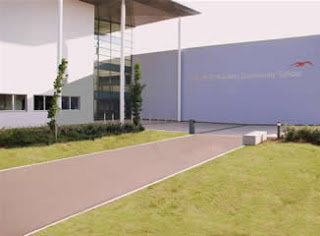
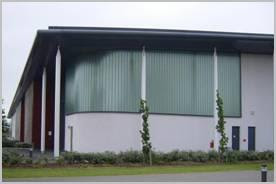
Here are the pictures of the location that we are using to film our project. We are filming on site of our 6th form as it is easier for the idea of our music video.
Below is the pictures of where we are shooting.

This is where the beginning of the music video will take place, where the 'dancing tramp' finds the iPod and begings to dance.

This is a image of the front of the school where the students will be exiting from school to find the main character dacning away.
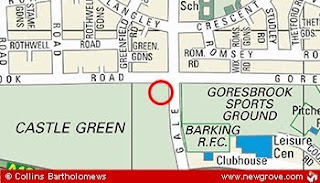
This is a map of where the School is.
Below is the pictures of where we are shooting.

This is where the beginning of the music video will take place, where the 'dancing tramp' finds the iPod and begings to dance.

This is a image of the front of the school where the students will be exiting from school to find the main character dacning away.


This is a map of where the School is.
Filming Schedule.
PERIOD 1 & 2 - Film all shots involving 'Ipod owner' and maybe some extra shots. Also film the last few shots involving the person picking up the headphones at the end of the video; maybe include some extra shots. Any 'bonus' establishing shots of the school etc.
PERIOD 3 & 4 - Footage involving both the 'Ipod owner' and 'Tramp' with the scenes where the Ipod is dropped and then picked up, also where the 'Tramp' is reacting to the music alone, also where he is approaching the school. Any shots with Mr.Smith seeing him (If he is available at this time)
PERIOD 5 - Any extra shots (maybe unplanned) of the tramp fitting, the manic camera work (shaky, frantic zooming in and out)
AFTER SCHOOL - Kids coming out of school, filming reactions to tramp, asking some of them to pretend to film with their phones, laugh, react to the tramp (ACT!)
PERIOD 3 & 4 - Footage involving both the 'Ipod owner' and 'Tramp' with the scenes where the Ipod is dropped and then picked up, also where the 'Tramp' is reacting to the music alone, also where he is approaching the school. Any shots with Mr.Smith seeing him (If he is available at this time)
PERIOD 5 - Any extra shots (maybe unplanned) of the tramp fitting, the manic camera work (shaky, frantic zooming in and out)
AFTER SCHOOL - Kids coming out of school, filming reactions to tramp, asking some of them to pretend to film with their phones, laugh, react to the tramp (ACT!)
Subscribe to:
Comments (Atom)